

Frequently Asked Questions
Below are some of the most frequently asked questions (FAQ) and the answers about MuVIT operation. Have a question? Contact us and we’ll try to answer it for you.
MuVIT FAQ
No. MuVIT is a recreational-boating training simulator and instructional tool. It uses simulation software and physical No controls to help users practice boating concepts and scenarios.
MuVIT can help you practice procedures, navigation concepts, instrument use, docking decisions, and situational awareness. It does not replace qualified instruction, local knowledge, or hands-on on-water training.
Depending on the Virtual Sailor NG vessel files installed, MuVIT can simulate runabouts, pontoon boats, PWCs, trawlers, cruisers, larger commercial vessels, and sailboats.
No. MuVIT is designed around readily available equipment. A Windows laptop, compatible steering wheel, display, and controls are the basic building blocks.
Yes. MuVIT can use NMEA 0183 networking to work with OpenCPN and other compatible navigation software.
In settings when you start the program, you set up your buttons and joysticks under the appropriate tabs then in the joysticks tab click the save button on the upper left and give your configuration a name. It doesn’t hurt to save as defaults if you don’t run multiple configurations. Sometimes the settings can be wiped out so it is also helpful to keep a printed copy of the setup handy.
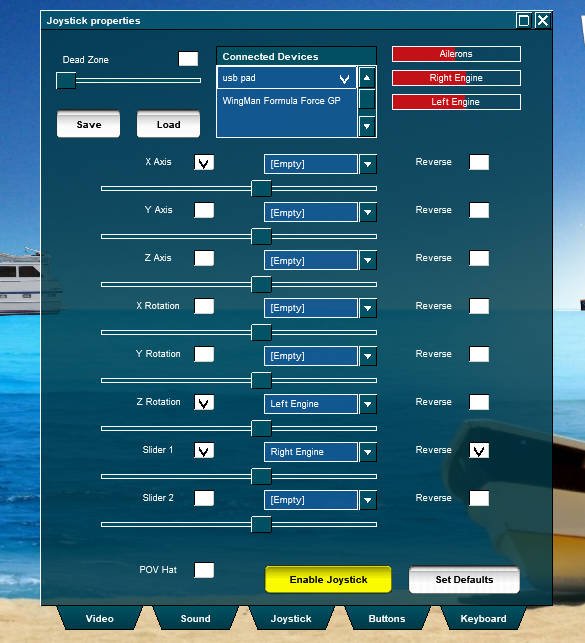
This is one of the quirks of Virtual Sailor. The developer used to write flight simulators and as a consequence you need to set the wheel to control ailerons. It is just one of those things that fell through the cracks. This blog post explains it in detail.
Under the Options > Joystick settings you will see a series of horizontal sliders in the center of the menu, these adjust the sensitivity of the controls. Make sure they are not at the far left unless you intend to render a control unusable.
For adding vessels we have a tutorial available, Once is coming soon on adding scenery. There are also tutorials available on the Virtual Sailor website. Some sceneries may require special attention so always read the directions on the page from which you download them or you may encounter avoidable problems.
In a word, yes. We wrote a tutorial about how to configure the VRInsight console for use with Virtual Sailor NG.
Probably, we use Unified Remote to act as the console, and it works with most tablets. Take a look in our tutorials section about how to get the server and configure it. You can use any supported Android or iOS tablet (or phone) you just have to be sure to get the appropriate client from the Unified Remote site.
Yes, If you have a MuVIT tablet you can select the Change Weather button or use the normal window’s toolbar at the top of the display and select Change > Weather. The menu that opens will allow you to adjust many weather parameters.
Yes, under the advanced weather tab you can enable dynamic tides.
Yes, wind is under the weather tab and currents are under the advanced weather tab found in the top of the window Change selection.
Yes, we put together a brief tutorial about how to create your own scenarios.
Yes, using the chart plotter to create waypoints and the autopilot to run the route you can set up as many vessels as your machine can support and they can operate independently. Here is a quick tutorial.
Yes, in the settings in the buttons tab, you can configure the camera to pan right and left; this allows a 360-degree view in both directions. On most wheels there are paddles behind the wheel, and these are what we recommend using, but you can map any button.

